Słowem wstępu
Jakiś czas temu podczas debugowania wielu małych plików, skorzystałem z pomocy AI. Nie chciałem w tym celu posłużyć się generowaniem kodu za pomocą agentów, ponieważ moim zdaniem ten sposób nie przynosi nam nawet grama nauki. Uważam że jeśli chcemy czegoś się nauczyć, warto wspomagać się czatem AI. Lecz dopiero po przeanalizowaniu i zrozumieniu otrzymanego kodu, możemy mówić o wykorzystaniu go.
Problemem na który natrafiłem, było to że mając wiele plików, musiałem treść każdego z nich ręcznie kopiować i wklejać w czat. Oczywiście po dokonaniu na nich zmian, musiałem robić to odnowa i tak w kółko (podczas rozmowy AI nie zawsze wyłapuje że naprawiliśmy plik - czasem odnosi się nadal do starszej wersji). Dodatkowo musiałem ręcznie dodawać odpowiednie ścieżki nad każdym takim listingiem, aby nasz chatbot znał strukture naszego programu.
Nasz program
W dzisiejszym dość krótkim wpisie, pokażę Ci przykład małego narzędzia którego zadaniem jest zarządzanie listingiem wybranych przez nas plików i przygotowanie ich jako kontekstu dla AI.
Co robi to narzędzie?
- Pozwala zebrać wybrane pliki projektu w jednym miejscu i zamienia je na jeden, dobrze sformatowany listing przygotowany do wklejenia do naszego czatu.
- Każdy zrzut pliku w naszym listingu, ma w nagłówku swoją ścieżkę oraz pełną zawartość, dzięki czemu AI lepiej rozumie strukturę projektu.
- Zakładka "kopiuj do schowka", automatycznie aktualizuje nasz schowek systemowy o zmiany które nanieśliśmy.
- Zakładka „pokaż cały kod” zawsze wyświetla aktualną wersję plików.
*Cały program jest napisany w formie helpera - jego zadaniem jest wspomaganie programisty tu i teraz - produkcyjna wersja wymaga jeszcze dużo dopracowania (w tym przygotowania tłumaczeń).
Screenshots:
Główne okno programu:
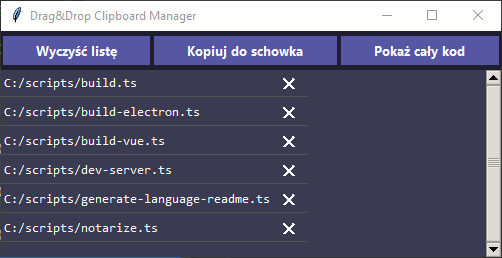
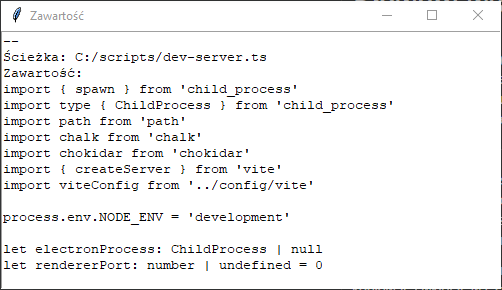
Po kliknięciu w przycisk "pokaż cały kod, otrzymujemy zaktualizowany listing wszystkich naszych kodów:
Kod:
Poniżej dla celów edukacyjnych przedstawiam kod, który zawiera w sobie parę smaczków. Ale to już pozostawiam dla chętnych.... :)
main.py
import os
import tkinter as tk
from tkinter import messagebox, ttk

import pyperclip
from tkinterdnd2 import DND_FILES, TkinterDnD


class FileStore:
    """Stores file paths and their content in application memory."""

    def __init__(self) -> None:
        """Initializes empty in-memory storage for files."""
        self.file_memory: list[str] = []
        self.file_names: list[str] = []

    def add(self, path: str, content: str) -> None:
        """Adds a file path and its content to memory."""

        if path in self.file_names:
            return

        self.file_names.append(path)
        self.file_memory.append(content)

    def remove(self, path: str) -> None:
        """Removes a file and its content from memory if it exists."""
        if path in self.file_names:
            idx = self.file_names.index(path)
            self.file_names.pop(idx)
            self.file_memory.pop(idx)

    def clear(self) -> None:
        """Clears all stored files and their content."""
        self.file_names.clear()
        self.file_memory.clear()

    def is_empty(self) -> bool:
        """Checks whether the store contains any files."""
        return not self.file_names

    def combined(self) -> str:
        """Returns all stored file contents as a single string."""
        return "\n\n".join(self.file_memory)


class FileService:
    """Handles reading files from disk."""

    @staticmethod
    def read_file(path: str) -> str:
        """Reads a file from disk and returns its formatted content."""
        with open(path, "r", encoding="utf-8", errors="ignore") as f:
            content = f.read()

        return f"--\nŚcieżka: {path}\nZawartość:\n{content}\n--"

    def load_all(self, paths: list[str]) -> list[str]:
        """Loads and reads all valid file paths from disk."""
        result = []
        for path in paths:
            if os.path.isfile(path):
                result.append(self.read_file(path))
        return result


class ClipboardService:
    """Provides access to system clipboard operations."""

    @staticmethod
    def copy(text: str) -> None:
        """Copies given text to the system clipboard."""
        pyperclip.copy(text)


class ClipboardManagerUI:
    """Builds and manages the Tkinter graphical user interface."""

    BG_COLOR = "#1e1e2f"
    LABEL_BG = "#3a3a50"
    LABEL_FG = "#ffffff"
    BTN_BG = "#5656a3"
    BTN_FG = "#ffffff"
    BTN_HOVER = "#7373c7"
    SEPARATOR_COLOR = "#555555"

    def __init__(self, root: tk.Tk, on_drop, on_remove, on_clear, on_refresh, on_show):
        """Initializes UI and binds external event handlers."""
        self.root = root

        self.on_drop = on_drop
        self.on_remove = on_remove
        self.on_clear = on_clear
        self.on_refresh = on_refresh
        self.on_show = on_show

        self._build()

    def _build(self) -> None:
        """Creates all UI components including buttons, layout, and drag-and-drop."""
        self.root.title("Drag&Drop Clipboard Manager")
        self.root.geometry("500x200")
        self.root.minsize(500, 100)
        self.root.resizable(False, True)
        self.root.configure(bg=self.BG_COLOR)
        self.root.attributes("-topmost", True)

        self.style = ttk.Style()
        self.style.theme_use("clam")

        self.style.configure(
            "TButton",
            font=("Segoe UI", 10, "bold"),
            foreground=self.BTN_FG,
            background=self.BTN_BG,
            borderwidth=0,
        )

        self.style.map(
            "TButton",
            background=[("active", self.BTN_HOVER)],
            foreground=[("disabled", "#aaaaaa")],
        )

        self.frame_main = tk.Frame(self.root, bg=self.BG_COLOR)
        self.frame_main.pack(fill="both", expand=True)

        btn_frame = tk.Frame(self.frame_main, bg=self.BG_COLOR)
        btn_frame.pack(fill="x", pady=5)

        ttk.Button(btn_frame, text="Wyczyść listę", command=self.on_clear).pack(
            side="left", expand=True, fill="x", padx=2
        )

        ttk.Button(btn_frame, text="Kopiuj do schowka", command=self.on_refresh).pack(
            side="left", expand=True, fill="x", padx=2
        )

        ttk.Button(btn_frame, text="Pokaż cały kod", command=self.on_show).pack(
            side="left", expand=True, fill="x", padx=2
        )

        self.list_frame = tk.Frame(self.frame_main, bg=self.LABEL_BG)
        self.list_frame.pack(fill="both", expand=True)

        self.canvas = tk.Canvas(
            self.list_frame,
            bg=self.LABEL_BG,
            highlightthickness=0,
        )

        self.scroll = ttk.Scrollbar(
            self.list_frame,
            orient="vertical",
            command=self.canvas.yview,
        )

        self.scrollable = tk.Frame(self.canvas, bg=self.LABEL_BG)

        self.scrollable.bind(
            "<Configure>",
            lambda e: self.canvas.configure(scrollregion=self.canvas.bbox("all")),
        )

        self.canvas.create_window((0, 0), window=self.scrollable, anchor="nw")
        self.canvas.configure(yscrollcommand=self.scroll.set)

        self.canvas.pack(side="left", fill="both", expand=True)
        self.scroll.pack(side="right", fill="y")

        self.canvas.drop_target_register(DND_FILES)
        self.canvas.dnd_bind("<<Drop>>", self.on_drop)

    def render_file_list(self, file_names: list[str]) -> None:
        """Renders the list of files in the scrollable UI area."""

        for widget in self.scrollable.winfo_children():
            widget.destroy()

        if not file_names:
            tk.Label(
                self.scrollable,
                text="(Przeciągnij pliki tutaj...)",
                bg=self.LABEL_BG,
                fg=self.LABEL_FG,
                font=("Consolas", 12),
            ).pack(fill="x", pady=5)
            return

        for file_path in file_names:
            row = tk.Frame(self.scrollable, bg=self.LABEL_BG)
            row.pack(fill="x")

            label = tk.Label(
                row,
                text=file_path,
                bg=self.LABEL_BG,
                fg=self.LABEL_FG,
                font=("Consolas", 10),
                anchor="w",
                justify="left",
                wraplength=450,
            )
            label.pack(side="left", fill="x", expand=True)

            x_btn = tk.Label(
                row,
                text="✕",
                fg="white",
                bg=self.LABEL_BG,
                cursor="hand2",
                font=("Segoe UI", 11, "bold"),
                width=2,
            )
            x_btn.pack(side="right", padx=5)

            x_btn.bind("<Button-1>", lambda e, path=file_path: self.on_remove(path))

            tk.Frame(
                self.scrollable,
                height=1,
                bg=self.SEPARATOR_COLOR,
            ).pack(fill="x", pady=(0, 2))


class ClipboardManager:
    """Coordinates application logic between UI, storage, and services."""

    def __init__(self) -> None:
        """Initializes application components and starts UI."""
        self.store = FileStore()
        self.file_service = FileService()
        self.clipboard = ClipboardService()

        self.root = TkinterDnD.Tk()

        self.ui = ClipboardManagerUI(
            root=self.root,
            on_drop=self.on_drop,
            on_remove=self.remove_file,
            on_clear=self.clear,
            on_refresh=self.refresh,
            on_show=self.show_all,
        )

        self.refresh()

    def add_file(self, path: str, content: str) -> None:
        """Adds a file to the application store."""
        self.store.add(path, content)
        self.refresh()

    def remove_file(self, path: str) -> None:
        """Removes a file from store and refreshes UI."""
        self.store.remove(path)
        self.refresh()

    def clear(self) -> None:
        """Clears all stored files and resets clipboard."""
        self.store.clear()
        self.refresh()
        self.clipboard.copy("")

    def refresh(self) -> None:
        """Synchronizes state, updates clipboard, and refreshes UI."""
        self.store.file_memory = self.file_service.load_all(self.store.file_names)
        self.clipboard.copy(self.store.combined())
        self.ui.render_file_list(self.store.file_names)

    def on_drop(self, event: tk.Event) -> None:
        """Handles drag-and-drop file input into the application."""
        files = self.root.tk.splitlist(event.data)

        for file_path in files:
            file_path = file_path.strip("{}")

            if os.path.isfile(file_path):
                try:
                    content = self.file_service.read_file(file_path)
                    self.add_file(file_path, content)
                except Exception as e:
                    print("Error:", e)

    def show_all(self) -> None:
        """Displays full content of all loaded files in a new window."""
        data = self.file_service.load_all(self.store.file_names)

        if not data:
            messagebox.showinfo("Info", "Brak plików")
            return

        win = tk.Toplevel(self.root)
        win.title("Zawartość")
        win.geometry("800x500")

        text = tk.Text(win, wrap="word")
        text.pack(expand=True, fill="both")

        text.insert("1.0", "\n\n".join(data))
        text.config(state="disabled")

    def run(self) -> None:
        """Starts the Tkinter application main loop."""
        self.root.mainloop()


if __name__ == "__main__":
    app = ClipboardManager()
    app.run()
requirements.txt
pyperclip
tkinterdnd2


Komentarze